Table Component
Introduction
The table component provides a powerful, composable system for building feature-rich data tables. Built with Livewire and Alpine.js, it offers pagination, sorting, searching, selection, bulk actions, column visibility controls, and more all with excellent accessibility and a clean, modern design.
Our approach uses composable traits on the backend and Blade components on the frontend, giving you complete control over your table's structure and behavior while maintaining clean, reusable code.
Installation
Use the sheaf artisan command to install the table component:
php artisan sheaf:install data-table
Basic Static Table
Let's start with a simple static table without any dynamic features.
|
Name
|
Email
|
Role
|
|---|---|---|
| Alice Johnson | alice@example.com | Admin |
| Bob Smith | bob@example.com | Editor |
| Carol White | carol@example.com | Viewer |
<x-ui.table>
    <x-ui.table.header>
        <x-ui.table.columns>
            <x-ui.table.head>Name</x-ui.table.head>
            <x-ui.table.head>Email</x-ui.table.head>
            <x-ui.table.head>Role</x-ui.table.head>
        </x-ui.table.columns>
    </x-ui.table.header>

    <x-ui.table.rows>
        <x-ui.table.row>
            <x-ui.table.cell>Alice Johnson</x-ui.table.cell>
            <x-ui.table.cell>alice@example.com</x-ui.table.cell>
            <x-ui.table.cell>Admin</x-ui.table.cell>
        </x-ui.table.row>
        <!-- More rows... -->
    </x-ui.table.rows>
</x-ui.table>
Sorting
Usage
Add column sorting with visual indicators and flexible behavior. To enable sorting, first add the App\Livewire\Concerns\WithSorting trait to your Livewire component:
use App\Models\User; use App\Livewire\Concerns\WithSorting; use App\Livewire\Concerns\WithPagination; class UsersTable extends Component { use WithSorting; public function render() { $users = User::query() ->when(filled($this->sortBy), function ($query) { return $this->applySorting($query); }) ->paginate(); return view('livewire.users-table', [ 'users' => $users, ]); } }
The $this->sortBy and $this->applySorting() methods come from the WithSorting trait.
In your table header view, mark sortable columns and pass the current sort state:
<x-ui.table.head
    column="name"
    sortable
    :currentSortBy="$sortBy"
    :currentSortDir="$sortDir"
>
    Name
</x-ui.table.head>
Key attributes:
column— Database column namesortable— Marks the column as sortablecurrentSortByandcurrentSortDir— Reactive Livewire properties tracking sort state
Note: If you want to restrict sorting on the backend, you can use the
sortableColumns()method on the component class.
Sorting Variants
There are two sorting variants:
default— Shows sorting icons on hover and cycles sorting on clickdropdown— Opens a menu where the user explicitly chooses the sorting direction
<x-ui.table.head column="name" sortable :currentSortBy="$sortBy" :currentSortDir="$sortDir" variant="default" <!-- default --> <!-- or --> variant="dropdown" > Name </x-ui.table.head>
You can see these variants in action on our interactive Math Theorems demo. Sorting by year uses the dropdown variant, while mathematician and difficulty columns use the default variant.
Sorting Algorithm
By default, sorting uses Eloquent’s native orderBy method.
For advanced cases, you may override sorting per column by defining a custom sorting algorithm in your Livewire component using sortUsingAlgorithm.
If a custom algorithm handles the active column, it is applied. If not, the system falls back automatically to the default SQL sorting.
public function sortUsingAlgorithm($query, string $column, string $direction): ?Builder
{
    if ($column === 'status') {
        return $query->orderByRaw("
            CASE
                WHEN status = 'in_dev' THEN 1
                WHEN status = 'ready' THEN 2
                WHEN status = 'production' THEN 3
            END {$direction}
        ");
    }

    return null;
}
the contract
- Return a
Builderwhen the column is handled. - Return
nullto delegate to the default sorter.
Pagination
Add pagination to your table by passing a Laravel paginator to the table component.
First, create a Livewire component that uses the App\Livewire\Concerns\WithPagination trait:
use App\Livewire\Concerns\WithPagination;

class UsersTable extends Component
{
    use WithPagination;

    public function render()
    {
        $users = User::query()
            ->paginate();
            // or (if using length-aware paginator with full variant)
            ->paginate($this->perPage);

        return view('livewire.users-table', [
            'users' => $users,
        ]);
    }
}
Then pass the paginator to the paginator prop in the view:
<x-ui.table
    :paginator="$users"
>
    <!-- table contents... -->
</x-ui.table>
More About Pagination
Search
Enable real-time search across your table data. To enable search, first add the App\Livewire\Concerns\WithSearch trait to your Livewire component:
use App\Models\User; use App\Livewire\Concerns\WithSearch; use App\Livewire\Concerns\WithPagination; class UsersTable extends Component { use WithSearch; public function render() { $users = User::query() ->when(filled($this->searchQuery), function ($query) { return $this->applySearch($query); }) ->paginate(); return view('livewire.users-table', [ 'users' => $users, ]); } protected function applySearch($query) { return $query->where('name', 'like', '%'.$this->searchQuery.'%'); } }
The applySearch() method is where you define your search logic.
Then bind an input to the search query:
<x-ui.input
    placeholder="Search..."
    leftIcon="magnifying-glass"
    wire:model.live="searchQuery" <!-- this is what's important -->
/>
See the search implementation in the complete guide below for a real-world layout.
Selection
The component comes with all the logic you need to add row selection and "select all" functionality for handling bulk actions. To enable selection, first add the App\Livewire\Concerns\WithSelection trait to your Livewire component:
use App\Models\User; use App\Livewire\Concerns\WithSelection; class UsersTable extends Component { use WithSelection; public function render() { $users = User::query()->paginate(); // This is crucial - it tells us about the visible rows on the page $this->visibleIds = $users->pluck('id') ->map(fn ($id) => (string) $id) ->toArray(); return view('livewire.users-table', [ 'users' => $users, ]); } }
Then in the view, add :checkboxId to each table.row component to show the checkbox at the start of the row. To add "check all" functionality, add withCheckAll to the table.columns component:
<x-ui.table.columns
    withCheckAll
>
    <!-- other head components -->
</x-ui.table.columns>

<!-- AND -->

<x-ui.table.row
    :checkboxId="$user->id"
    :key="$user->id"
>
    <!-- cells... -->
</x-ui.table.row>
Now you can perform operations on the selected IDs like this:
public function deleteSelected()
{
    User::query()->whereIn('id', $this->selectedIds)->delete();
}

public function archiveSelected()
{
    User::query()->whereIn('id', $this->selectedIds)->each->archive();
}
Loading States
Due to the nature of datatables being usually data-heavy, this component comes with a clean way to handle loading states.
To enable loading indicators, just add wire:loading to the table component:
<x-ui.table
    wire:loading
>
    <!-- table content... -->
</x-ui.table>
For convenience, we've made it easy to enable loading on sorting, searching, and pagination by passing them comma-separated to the loadOn prop:
<x-ui.table
    wire:loading
    loadOn="pagination, search, sorting"
>
    <!-- table content... -->
</x-ui.table>
To add other targets, you can use wire:target as you would in regular usage:
<x-ui.table
    wire:loading
    wire:target="customAction, archiveSomething"
>
    <!-- table content... -->
</x-ui.table>
you can completly customize the loading state stuffs by using the loading slot
<x-ui.table>
    <x-slot:loading class="size-12 bg-white/5 rounded-lg">
            <x-ui.icon.loading class="dark:invert size-10"/>
    </x-slot:loading>
</x-ui.table>
Ordering
Ordering allows users to rearrange table rows visually and persist the new order on the backend.
Usage
To enable row reordering, mark the table as reorderable.
<x-ui.table
    reorderable
>
    <!-- table contents -->
</x-ui.table>
Each table row must expose its current order value. This value determines the row's position.
<x-ui.table.rows>
    @forelse($users as $user)
        <x-ui.table.row
            :checkboxId="$user->id"
            :order="$user->order"
            :key="$user->id"
        >
            <!-- ... -->
        </x-ui.table.row>
    @endforelse
</x-ui.table.rows>
When a row is moved, the table emits the moved item identifier and its target position.
Backend Handling
Add the App\Livewire\Concerns\Reorderable trait to your component and implement handleReordering:
use App\Livewire\Concerns\Reorderable;

class UsersTable extends Component
{
    use Reorderable;

    public function render()
    {
        $users = User::query()->paginate();

        return view('livewire.users-table', ['users' => $users]);
    }

    public function handleReordering($item, int $position): void
    {
        $this->reorderTransaction(function () use ($item, $position) {
            $user = User::findOrFail($item);

            $this->reorderWithinScope(model: $user, newPosition: $position);
        });
    }
}
If you prefer a different method name, update the x-sort="$wire.handleReordering" binding on table.rows.
Scoping Reorders
If your rows belong to a parent, a category, a board column, a project, pass a scope closure so only sibling rows are shifted. Without it, the trait shifts every row in the table.
public function handleReordering($item, int $position): void
{
    $this->reorderTransaction(function () use ($item, $position) {
        $task = Task::findOrFail($item);

        $this->reorderWithinScope(
            model: $task,
            newPosition: $position,
            scope: fn ($q) => $q->where('project_id', $task->project_id)
        );
    });
}
Stickiness
Make columns or headers stick to the viewport while scrolling.
Sticky Header
Keep the header visible while scrolling through long tables:
|
Product
|
Price
|
Stock
|
|---|---|---|
| Product 1 | $56 | 19 |
| Product 2 | $66 | 5 |
| Product 3 | $43 | 14 |
| Product 4 | $28 | 39 |
| Product 5 | $15 | 19 |
| Product 6 | $75 | 2 |
| Product 7 | $56 | 5 |
| Product 8 | $60 | 17 |
| Product 9 | $99 | 10 |
| Product 10 | $63 | 50 |
| Product 11 | $44 | 10 |
| Product 12 | $34 | 0 |
| Product 13 | $81 | 29 |
| Product 14 | $31 | 47 |
| Product 15 | $62 | 17 |
| Product 16 | $83 | 6 |
| Product 17 | $10 | 22 |
| Product 18 | $88 | 49 |
| Product 19 | $25 | 27 |
| Product 20 | $62 | 38 |
<x-ui.table class="max-h-96">
    <x-ui.table.header sticky class="dark:bg-neutral-900 bg-white">
        <x-ui.table.columns>
            <x-ui.table.head>Product</x-ui.table.head>
            <x-ui.table.head>Price</x-ui.table.head>
        </x-ui.table.columns>
    </x-ui.table.header>

    <!-- ... -->
</x-ui.table>
Sticky Column
Make the first column stick when scrolling horizontally:
|
Name
|
Email
|
Department
|
Location
|
Start Date
|
End Date
|
|---|---|---|---|---|---|
| Alice Johnson | alice@company.com | Engineering | San Francisco, CA | 2023-01-15 | 2029-01-15 |
| Bob Smith | bob@company.com | Marketing | New York, NY | 2022-08-20 | 2028-08-20 |
<x-ui.table.header sticky class="dark:bg-neutral-900 bg-white">
    <x-ui.table.columns>
        <x-ui.table.head
            sticky
            class="dark:bg-neutral-900 bg-white"
        >
            Name
        </x-ui.table.head>
        <!-- Other headers... -->
    </x-ui.table.columns>
</x-ui.table.header>

<x-ui.table.rows>
    <x-ui.table.row>
        <x-ui.table.cell
            sticky
            class="dark:bg-neutral-950 bg-neutral-50"
        >
            Alice Johnson
        </x-ui.table.cell>
        <!-- Other cells... -->
    </x-ui.table.row>
</x-ui.table.rows>
Note: When using sticky headers or columns, always apply a background color to prevent content overlap during scrolling.
when you've enable reorderable feature with sticky columns, adding background color to rows will kill the animated opacity for the sticky cell, so it's better to add the background only if there is not a sorting happenings and you can do that easily by using [body:not(.sorting)_&]: as a variant there.
<x-ui.table.row
    :checkboxId="$theorem->id"
    :key="$theorem->id"
>
    <x-ui.table.cell
        sticky
        class="[body:not(.sorting)_&]:dark:bg-neutral-950 [body:not(.sorting)_&]:bg-neutral-50"
    >
        {{ $theorem->id }}
    </x-ui.table.cell>
    <!-- .... -->
</x-ui.table.row>
Implementation Guide
Overview
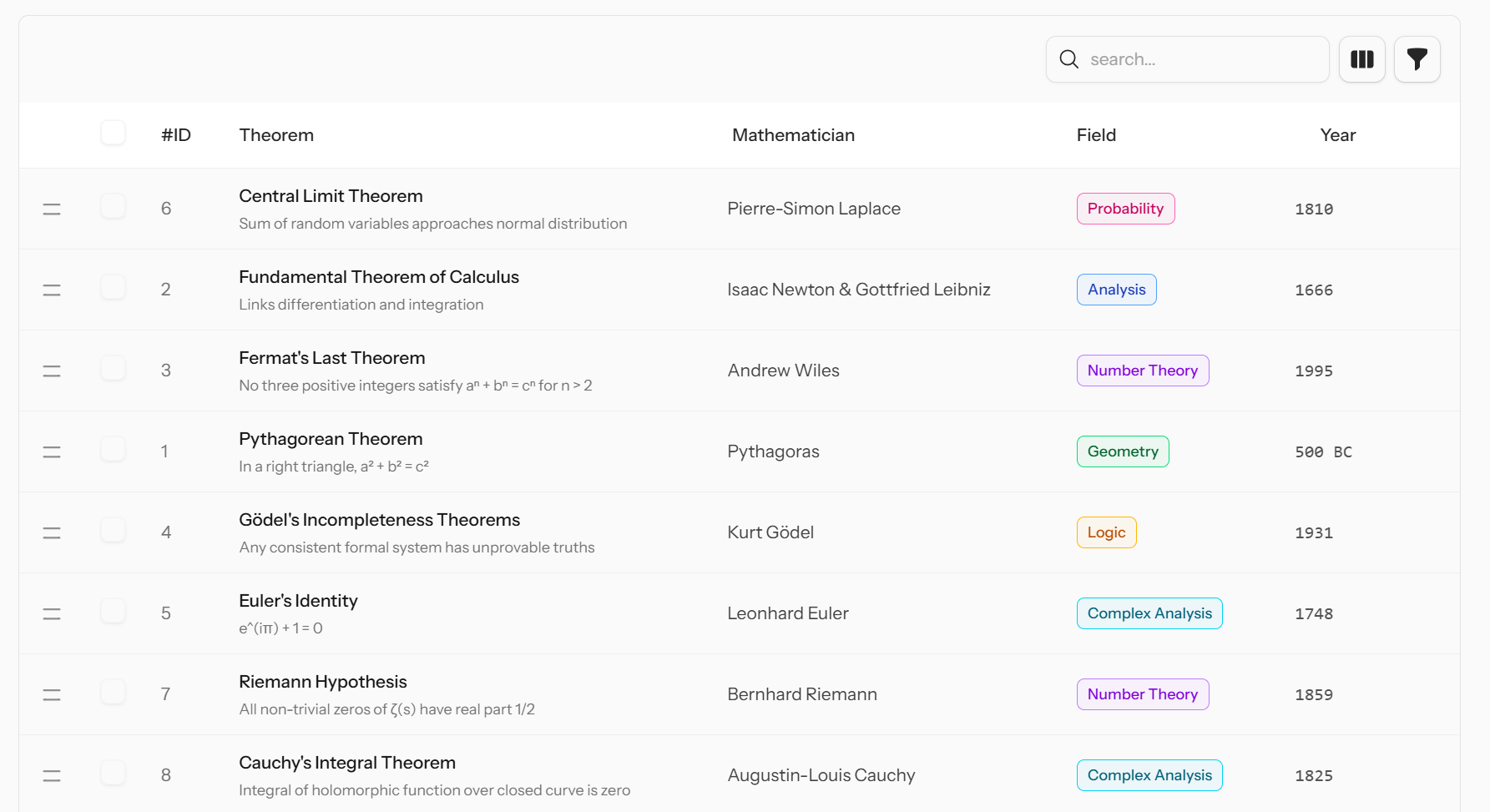
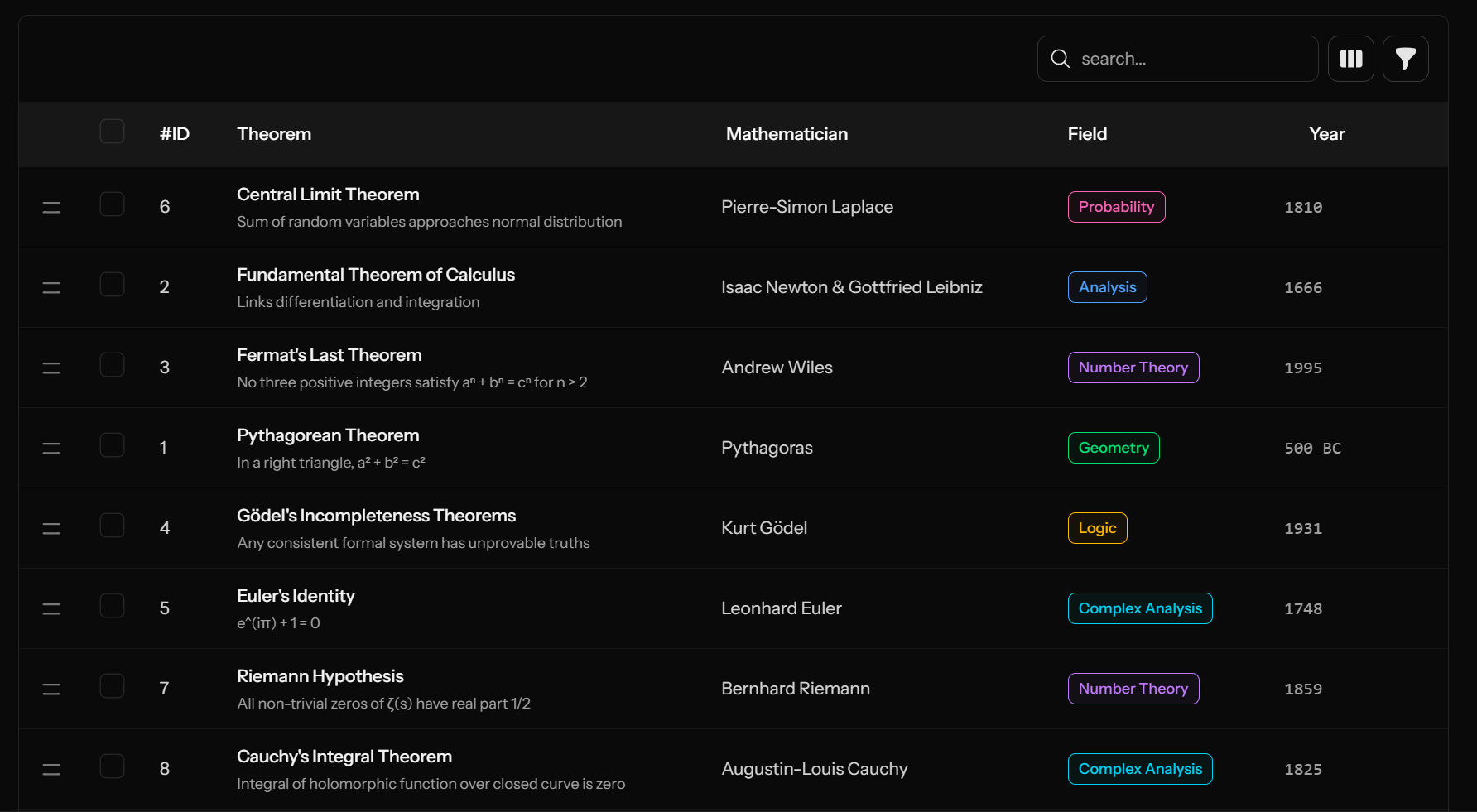
This guide walks you through building a polished, feature-rich data table using the table component alongside other utilities. We'll display a list of mathematical theorems, including their discovery year and the mathematicians behind them.
Setup Theorems Data
First, create a Theorem model with fields: id, name, mathematician, field, year_discovered, difficulty_level, is_proven, statement, and applications.
For this demo, we use the Sushi package with an in-memory array model. Our App\Models\Theorem looks like this:
<?php

declare(strict_types=1);

namespace App\Models;

use Illuminate\Database\Eloquent\Model;
use Sushi\Sushi;

class Theorem extends Model
{
    use Sushi;

    protected $casts = [
        'year_discovered' => 'integer',
        'difficulty_level' => 'integer',
        'is_proven' => 'boolean',
    ];

    protected function getRows(): array
    {
        return [
            ['id' => 1, 'name' => 'Pythagorean Theorem', 'mathematician' => 'Pythagoras', 'field' => 'Geometry', 'year_discovered' => -500, 'difficulty_level' => 2, 'is_proven' => true, 'statement' => 'In a right triangle, a² + b² = c²', 'applications' => 'Architecture, Navigation'],
            ['id' => 2, 'name' => 'Fundamental Theorem of Calculus', 'mathematician' => 'Isaac Newton & Gottfried Leibniz', 'field' => 'Analysis', 'year_discovered' => 1666, 'difficulty_level' => 7, 'is_proven' => true, 'statement' => 'Links differentiation and integration', 'applications' => 'Physics, Engineering'],
            // ... (rest of theorems)
        ];
    }
}
Note: This demo uses array-based models for simplicity. Your real application will use standard Laravel Eloquent models, but the integration remains the same regardless of data source.
Table with Pagination
Add the App\Livewire\Concerns\WithPagination trait to your Livewire component to enable pagination:
use App\Models\Theorem;
use App\Livewire\Concerns\WithPagination;
use Illuminate\Database\Eloquent\Builder;

class Theorems extends Component
{
    use WithPagination;

    public function render()
    {
        $theorems = $this->baseQuery()->paginate($this->perPage);

        return view('livewire.theorems', [
            'theorems' => $theorems,
        ]);
    }

    protected function baseQuery(): Builder
    {
        return Theorem::query();
    }
}
Key points:
- We use a custom
WithPaginationtrait that extends Livewire's native pagination with a$perPageproperty and reactive updates - The
baseQuery()method encapsulates the core query builder, making it reusable for sorting, filtering, and other operations in later steps
The view integrates pagination and displays theorem details with badges and icons:
<x-ui.table
    :paginator="$theorems"
    pagination:variant="full"
>
    <x-ui.table.header>
        <x-ui.table.columns>
            <x-ui.table.head>ID</x-ui.table.head>
            <x-ui.table.head>Theorem</x-ui.table.head>
            <x-ui.table.head>Mathematician</x-ui.table.head>
            <x-ui.table.head>Field</x-ui.table.head>
            <x-ui.table.head>Year</x-ui.table.head>
            <x-ui.table.head>Difficulty</x-ui.table.head>
            <x-ui.table.head>Status</x-ui.table.head>
        </x-ui.table.columns>
    </x-ui.table.header>

    <x-ui.table.rows>
        @forelse($theorems as $theorem)
            <x-ui.table.row :key="$theorem->id">
                <x-ui.table.cell sticky class="dark:bg-neutral-950 bg-neutral-50">
                    {{ $theorem->id }}
                </x-ui.table.cell>

                <x-ui.table.cell>
                    <div class="max-w-xs">
                        <div class="font-medium text-neutral-900 dark:text-neutral-100">
                            {{ $theorem->name }}
                        </div>
                        <div class="text-xs text-neutral-500 dark:text-neutral-400 mt-1 line-clamp-2">
                            {{ $theorem->statement }}
                        </div>
                    </div>
                </x-ui.table.cell>

                <x-ui.table.cell>
                    <div class="text-sm text-neutral-700 dark:text-neutral-300">
                        {{ $theorem->mathematician }}
                    </div>
                </x-ui.table.cell>

                <x-ui.table.cell>
                    @php
                        $fieldColors = [
                            'Number Theory' => 'purple',
                            'Analysis' => 'blue',
                            'Geometry' => 'green',
                            // ... more field colors
                        ];
                        $color = $fieldColors[$theorem->field] ?? 'neutral';
                    @endphp
                    <x-ui.badge :color="$color" size="sm" variant="outline">
                        {{ $theorem->field }}
                    </x-ui.badge>
                </x-ui.table.cell>

                <x-ui.table.cell>
                    <div class="text-sm font-mono text-neutral-600 dark:text-neutral-400">
                        {{ $theorem->year_discovered < 0 ? abs($theorem->year_discovered) . ' BC' : $theorem->year_discovered }}
                    </div>
                </x-ui.table.cell>

                <x-ui.table.cell>
                    <div class="flex items-center gap-1">
                        @for($i = 1; $i <= min($theorem->difficulty_level, 10); $i++)
                            <svg class="size-3 {{ $i <= 3 ? 'text-green-500' : ($i <= 6 ? 'text-yellow-500' : 'text-red-500') }}" fill="currentColor" viewBox="0 0 20 20">
                                <path d="M9.049 2.927c.3-.921 1.603-.921 1.902 0l1.07 3.292a1 1 0 00.95.69h3.462c.969 0 1.371 1.24.588 1.81l-2.8 2.034a1 1 0 00-.364 1.118l1.07 3.292c.3.921-.755 1.688-1.54 1.118l-2.8-2.034a1 1 0 00-1.175 0l-2.8 2.034c-.784.57-1.838-.197-1.539-1.118l1.07-3.292a1 1 0 00-.364-1.118L2.98 8.72c-.783-.57-.38-1.81.588-1.81h3.461a1 1 0 00.951-.69l1.07-3.292z" />
                            </svg>
                        @endfor
                    </div>
                    <div class="text-xs text-neutral-500 dark:text-neutral-400 mt-1">
                        Level {{ $theorem->difficulty_level }}
                    </div>
                </x-ui.table.cell>

                <x-ui.table.cell>
                    @if($theorem->is_proven)
                        <x-ui.badge icon="check-circle" color="green" size="sm" variant="outline">
                            Proven
                        </x-ui.badge>
                    @else
                        <x-ui.badge icon="exclamation-triangle" color="orange" size="sm" variant="outline">
                            Conjecture
                        </x-ui.badge>
                    @endif
                </x-ui.table.cell>
            </x-ui.table.row>
        @empty
            <!-- to implement in upcoming section -->
        @endforelse
    </x-ui.table.rows>
</x-ui.table>
Add Sorting
Enable column sorting with visual indicators and flexible behavior.
Step 1: Add the Trait
Include the App\Livewire\Concerns\WithSorting trait in your Livewire component:
use App\Models\Theorem;
use App\Livewire\Concerns\WithSorting;
use App\Livewire\Concerns\WithPagination;

class Theorems extends Component
{
    use WithSorting;
    use WithPagination;

    public function render()
    {
        $theorems = $this->baseQuery()
            ->when(filled($this->sortBy), function ($query) {
                return $this->applySorting($query);
            })
            ->paginate($this->perPage);

        return view('livewire.theorems', [
            'theorems' => $theorems,
        ]);
    }

    protected function baseQuery(): Builder
    {
        return Theorem::query();
    }
}
Step 2: Update the View
Let's make mathematician, year, and difficulty sortable, while making sort by year special by using the dropdown sorting variant:
<x-ui.table
    :paginator="$theorems"
    pagination:variant="full"
    loadOn="pagination, sorting"
>
    <x-ui.table.header>
        <x-ui.table.columns>
            <!-- other headers -->
            <x-ui.table.head
                column="mathematician"
                sortable
                :currentSortBy="$sortBy"
                :currentSortDir="$sortDir"
            >
                Mathematician
            </x-ui.table.head>

            <x-ui.table.head>
                Field
            </x-ui.table.head>

            <x-ui.table.head
                column="year_discovered"
                sortable
                variant="dropdown"
                :currentSortBy="$sortBy"
                :currentSortDir="$sortDir"
            >
                Year
            </x-ui.table.head>

            <x-ui.table.head
                column="difficulty_level"
                sortable
                :currentSortBy="$sortBy"
                :currentSortDir="$sortDir"
            >
                Difficulty
            </x-ui.table.head>

            <x-ui.table.head>
                Status
            </x-ui.table.head>
        </x-ui.table.columns>
    </x-ui.table.header>

    <!-- table rows... -->
</x-ui.table>
Add Search
Enable real-time search across your table data.
Step 1: Add the Trait
Include the WithSearch trait:
<?php

namespace App\Livewire;

use App\Models\Theorem;
use Livewire\Component;
use App\Livewire\Concerns\WithPagination;
use App\Livewire\Concerns\WithSorting;
use App\Livewire\Concerns\WithSearch;

class Theorems extends Component
{
    use WithPagination;
    use WithSorting;
    use WithSearch;

    public function render()
    {
        $theorems = $this->baseQuery()
            ->when(filled($this->sortBy), function ($query) {
                return $this->applySorting($query);
            })
            ->when(filled($this->searchQuery), function ($query) {
                return $this->applySearch($query);
            })
            ->paginate($this->perPage);

        return view('livewire.theorems', [
            'theorems' => $theorems,
        ]);
    }

    protected function applySearch($query)
    {
        return $query->where('name', 'like', '%'.$this->searchQuery.'%')
            ->orWhere('mathematician', 'like', '%'.$this->searchQuery.'%')
            ->orWhere('field', 'like', '%'.$this->searchQuery.'%')
            ->orWhere('statement', 'like', '%'.$this->searchQuery.'%');
    }

    protected function baseQuery(): Builder
    {
        return Theorem::query();
    }
}
Step 2: Add the Search Input
First, let's wrap our table and all filter logic into the table.container Blade component, which is responsible for managing padding between pagination, table, and filters in a clean way:
<x-ui.table.container>
    <div class="flex items-center">
        {{-- SEARCH INPUT --}}
        <div class="ml-auto">
            <x-ui.input
                class="[&_input]:bg-transparent" <!-- target underlying input and make it transparent -->
                placeholder="Search..."
                leftIcon="magnifying-glass"
                wire:model.live="searchQuery"
            />
        </div>
    </div>

    <x-ui.table
        :paginator="$theorems"
        pagination:variant="full"
        loadOn="pagination, search, sorting"
    >
        <!-- table contents... -->
    </x-ui.table>
</x-ui.table.container>
Handle Empty States
Provide helpful feedback when no results are found using our empty state component:
No theorems foundTry adjusting your search or filters. |
<x-ui.table.rows>
    @forelse ($theorems as $user)
       <!-- hidden contents -->
    @empty
      <x-ui.table.empty>
            <x-ui.empty>
                <x-ui.empty.media>
                    <x-ui.icon name="inbox" class="size-10" />
                </x-ui.empty.media>
                <x-ui.empty.contents>
                    <h3 class="text-lg font-semibold">No theorems found</h3>
                    <p class="text-sm text-neutral-500">
                        Try adjusting your search or create a new user.
                    </p>
                </x-ui.empty.contents>
            </x-ui.empty>
        </x-ui.table.empty>
    @endforelse
</x-ui.table.rows>
Add Checkbox Selection
Enable row selection with checkboxes and a "select all" header.
Step 1: Add the Trait
Include the WithSelection trait:
<?php namespace App\Livewire; use App\Models\Theorem; use Livewire\Component; use App\Livewire\Concerns\WithPagination; use App\Livewire\Concerns\WithSorting; use App\Livewire\Concerns\WithSearch; use App\Livewire\Concerns\WithSelection; class Theorems extends Component { use WithPagination; use WithSorting; use WithSearch; use WithSelection; public function render() { $theorems = $this->baseQuery()->...(); // Store visible IDs for "select all" functionality $this->visibleIds = $theorems->pluck('id') ->map(fn ($id) => (string) $id) ->toArray(); return view('livewire.theorems', [ 'theorems' => $theorems, ]); } }
Step 2: Add Checkboxes to the View
Enable the "check all" header and add checkboxes to rows:
<x-ui.table.columns
    withCheckAll
>
    <!-- header cells... -->
</x-ui.table.columns>

<!-- AND -->

<x-ui.table.rows>
    @foreach ($theorems as $theorem)
        <x-ui.table.row
            :key="$theorem->id"
            :checkboxId="$theorem->id"
        >
            <!-- cells... -->
        </x-ui.table.row>
    @endforeach
</x-ui.table.rows>
Bulk Actions (Delete and CSV Export Example)
Let's add bulk action buttons that only show when there are selected rows. We'll implement delete and CSV export for the selected rows.
Step 1: Add the CSV Export Trait
Include the CanExportCsv trait:
<?php namespace App\Livewire; use App\Livewire\Concerns\CanExportCsv; use Livewire\Attributes\Renderless; class Theorems extends Component { use WithPagination; use WithSorting; use WithSearch; use WithSelection; use CanExportCsv; #[Renderless] public function exportSelected() { $theorems = $this->baseQuery(); if (filled($this->selectedIds)) { $theorems = $theorems->whereIn('id', $this->selectedIds); } // Apply filters like search and sorting if you want // then convert them into CSV... return $this->csv($theorems->get()); } public function deleteSelected() { // ⚠️ Don't forget validation & authorization // Gate::authorize('delete-theorem', Theorem::class); $this->baseQuery() ->whereIn('id', $this->selectedIds) ->delete(); // You may clear selection after deletes $this->deselectAll(); } // other methods... }
Step 2: Add Bulk Actions UI
Add bulk action controls that appear when rows are selected:
<x-ui.table.container>
    <div class="flex items-center">
        {{-- BULK ACTIONS --}}
        <div
            style="display:none;"
            wire:show="selectedIds.length"
        >
            <x-ui.dropdown position="bottom-start">
                <x-slot:button class="justify-center">
                    <!-- desktop button -->
                    <x-ui.button
                        icon="ellipsis-vertical"
                        variant="soft"
                        size="sm"
                        class="
                            rounded-box mr-2 [@media(width<40rem)]:hidden outline
                            dark:outline-white/20 outline-neutral-900/10
                            dark:ring-white/15 ring-neutral-900/15
                            [[data-open]>&]:bg-white/5 [[data-open]>&]:ring-2 shadow-sm
                        "
                    >
                        Bulk Actions
                    </x-ui.button>

                    <!-- mobile button (icon only) -->
                    <x-ui.button
                        icon="ellipsis-vertical"
                        variant="soft"
                        size="sm"
                        class="
                            rounded-box mr-2 sm:hidden outline dark:outline-white/20
                            outline-neutral-900/10 dark:ring-white/15 ring-neutral-900/15
                            [[data-open]>&]:bg-white/5 [[data-open]>&]:ring-2 shadow-sm
                        "
                    />
                </x-slot:button>

                <x-slot:menu>
                    <x-ui.dropdown.item
                        icon="arrow-down-on-square"
                        wire:click="exportSelected"
                    >
                        Export Selected CSV
                    </x-ui.dropdown.item>

                    <x-ui.dropdown.item
                        icon="trash"
                        variant="danger"
                        wire:click="deleteSelected"
                        wire:confirm="Are you sure you want to delete?"
                    >
                        Delete Selected
                    </x-ui.dropdown.item>
                </x-slot:menu>
            </x-ui.dropdown>
        </div>

        {{-- SEARCH INPUT --}}
        <div class="ml-auto">
            <x-ui.input
                class="[&_input]:bg-transparent"
                placeholder="Search..."
                leftIcon="magnifying-glass"
                wire:model.live="searchQuery"
            />
        </div>
    </div>

    <x-ui.table ...>
        <!-- table content... -->
    </x-ui.table>
</x-ui.table.container>
Add Column Visibility
Let's make status and difficulty hideable columns in our theorems table. Here's how:
|
#ID
|
Theorem
|
Mathematician
|
Field
|
Year
|
Difficulty
|
Status
|
|---|---|---|---|---|---|---|
| 1 | Fundamental Theorem of Calculus | Isaac Newton & Gottfried Leibniz | 1666 | 7 | ||
| 2 | Fermat's Last Theorem | Andrew Wiles | 1995 | 10 |
<x-ui.table.container x-data="{ hiddenCols: ['status', 'difficulty'] }">
    <div class="flex items-center">
        <!-- BULK ACTIONS CONTENT... -->
        <!-- SEARCH INPUT CONTENT... -->

        {{-- HIDDEN COLUMNS --}}
        <x-ui.dropdown
            checkbox
            checkboxVariant
            position="bottom-end"
        >
            <x-slot:button>
                <x-ui.button
                    icon="view-columns"
                    variant="soft"
                    size="sm"
                    class="rounded-box ml-2 outline dark:outline-white/20 outline-neutral-900/10 dark:ring-white/15 ring-neutral-900/15 [[data-open]>&]:bg-white/5 [[data-open]>&]:ring-2 shadow-sm"
                />
            </x-slot:button>

            <x-slot:menu>
                <x-ui.dropdown.item readOnly>
                    Hidden Columns
                </x-ui.dropdown.item>
                <x-ui.dropdown.separator/>
                <x-ui.dropdown.item value="difficulty" x-model="hiddenCols">
                    Difficulty
                </x-ui.dropdown.item>
                <x-ui.dropdown.item value="status" x-model="hiddenCols">
                    Status
                </x-ui.dropdown.item>
            </x-slot:menu>
        </x-ui.dropdown>
    </div>

    <x-ui.table
        :paginator="$theorems"
        pagination:variant="full"
        loadOn="pagination, search, sorting"
    >
        <x-ui.table.header sticky class="dark:bg-neutral-900 bg-white">
            <x-ui.table.columns withCheckAll>
                <x-ui.table.head sticky class="dark:bg-neutral-900 bg-white">
                    #ID
                </x-ui.table.head>
                <x-ui.table.head>Theorem</x-ui.table.head>
                <x-ui.table.head
                    column="mathematician"
                    sortable
                    :currentSortBy="$sortBy"
                    :currentSortDir="$sortDir"
                >
                    Mathematician
                </x-ui.table.head>
                <x-ui.table.head>Field</x-ui.table.head>
                <x-ui.table.head
                    column="year_discovered"
                    sortable
                    variant="dropdown"
                    :currentSortBy="$sortBy"
                    :currentSortDir="$sortDir"
                >
                    Year
                </x-ui.table.head>
                <x-ui.table.head
                    column="difficulty_level"
                    sortable
                    :currentSortBy="$sortBy"
                    :currentSortDir="$sortDir"
                    x-show="!hiddenCols.includes('difficulty')"
                >
                    Difficulty
                </x-ui.table.head>
                <x-ui.table.head
                    x-show="!hiddenCols.includes('status')"
                >
                    Status
                </x-ui.table.head>
            </x-ui.table.columns>
        </x-ui.table.header>

        <x-ui.table.rows>
            @forelse($theorems as $theorem)
                <x-ui.table.row
                    :checkboxId="$theorem->id"
                    :key="$theorem->id"
                >
                    <!-- ID, Theorem, Mathematician, Field, Year cells... -->

                    <x-ui.table.cell
                        x-show="!hiddenCols.includes('difficulty')"
                    >
                        <!-- difficulty stars -->
                        <div class="text-xs text-neutral-500 dark:text-neutral-400 mt-1">
                            Level {{ $theorem->difficulty_level }}
                        </div>
                    </x-ui.table.cell>

                    <x-ui.table.cell
                        x-show="!hiddenCols.includes('status')"
                    >
                        @if($theorem->is_proven)
                            <x-ui.badge icon="check-circle" color="green" size="sm" variant="outline">
                                Proven
                            </x-ui.badge>
                        @else
                            <x-ui.badge icon="exclamation-triangle" color="orange" size="sm" variant="outline">
                                Conjecture
                            </x-ui.badge>
                        @endif
                    </x-ui.table.cell>
                </x-ui.table.row>
            @empty
                <!-- empty state... -->
            @endforelse
        </x-ui.table.rows>
    </x-ui.table>
</x-ui.table.container>
Persisting Column Preferences
Use Alpine's $persist plugin to save user preferences across sessions:
x-data="{
    hiddenCols: $persist(['status', 'difficulty']).as('table-hidden-columns')
}"
This stores the user's column visibility choices in localStorage.
Adding Reordering
Two approaches: The guide below uses an in-memory
$positionsarray — no databaseordercolumn required, great for demos and simple lists. For production use with persistent ordering, see the Reorderable trait docs above which handles database shifting, scoping, and transactions for you.
<x-ui.table
    reorderable
>
    <!-- table contents -->
</x-ui.table>
Each table row must expose its current order value. This value determines the row’s position.
<x-ui.table.rows>
    @forelse($users as $user)
        <x-ui.table.row
            :checkboxId="$user->id"
            :order="$user->order"
            :key="$user->id"
        >
            <!-- ... -->
        </x-ui.table.row>
    @endforelse
</x-ui.table.rows>
<?php

declare(strict_types=1);

class Theorems extends Component
{
    // traits...

    #[Session()]
    public array $positions = [];

    public function mount()
    {
        if (empty($this->positions)) {
            $this->positions = $this->baseQuery()
                ->pluck('id')
                ->toArray();
        }
    }

    public function render(): View
    {
        $theorems = $this->baseQuery()
            ->when(filled($this->sortBy), function ($query) {
                return $this->applySorting($query);
            })
            ->when(filled($this->searchQuery), function ($query) {
                return $this->applySearch($query);
            })
            ->when(filled($this->positions), function ($query) {
                return $this->applyPositionSorting($query);
            })
            ->paginate($this->perPage);

        // more stuff

        return view('livewire.theorems', [
            'theorems' => $theorems,
        ]);
    }


    public function handleReordering($item, $position)
    {
        $itemId = (int) $item;
        // Remove item from current position
        $positions = array_values(array_filter($this->positions, fn ($id) => $id !== $itemId));
        // Insert at new position
        array_splice($positions, $position, 0, [$itemId]);
        $this->positions = $positions;
    }

    protected function applyPositionSorting(Builder $query): Builder
    {
        if (empty($this->positions)) {
            return $query;
        }
        $case = 'CASE';
        foreach ($this->positions as $index => $id) {
            $case .= " WHEN id = {$id} THEN {$index}";
        }
        $case .= ' END';
        return $query->orderByRaw($case);
    }

}
Guide's Full Code Source
Livewire/Theorems.php livewire class component
<?php

declare(strict_types=1);

namespace Src\Components\Livewire\Demos;

use Illuminate\Database\Eloquent\Builder;
use Illuminate\View\View;
use Livewire\Attributes\Session;
use Livewire\Component;
use Livewire\Attributes\Renderless;
use Src\Components\Livewire\Concerns\CanExportCsv;
use Src\Components\Livewire\Concerns\WithPagination;
use Src\Components\Livewire\Concerns\WithSearch;
use Src\Components\Livewire\Concerns\WithSelection;
use Src\Components\Livewire\Concerns\WithSorting;
use Src\Components\Models\Theorem;

class Theorems extends Component
{
    use CanExportCsv;
    use WithPagination;
    use WithSearch;
    use WithSelection;
    use WithSorting;

    #[Session()]
    public array $positions = [];

    public function mount()
    {
        if (empty($this->positions)) {
            $this->positions = $this->baseQuery()
                ->pluck('id')
                ->toArray();
        }
    }

    public function render(): View
    {
        $theorems = $this->baseQuery()
            ->when(filled($this->sortBy), function ($query) {
                return $this->applySorting($query);
            })
            ->when(filled($this->searchQuery), function ($query) {
                return $this->applySearch($query);
            })
            ->when(filled($this->positions), function ($query) {
                return $this->applyPositionSorting($query);
            })
            ->paginate($this->perPage);

        $this->visibleIds = $theorems->pluck('id')->map(fn ($id) => (string) $id)->toArray();

        return view('livewire.theorems', [
            'theorems' => $theorems,
        ]);
    }

    #[Renderless]
    public function toCsv()
    {
        $theorems = $this->baseQuery();

        if (filled($this->searchQuery)) {
            $theorems = $this->applySearch($theorems);
        }

        if (filled($this->sortBy)) {
            $theorems = $this->applySorting($theorems);
        }

        if (filled($this->selectedIds)) {
            $theorems = $this->applySelection($theorems);
        }

        return $this->csv($theorems->get());
    }

    public function handleReordering($item, $position)
    {
        $itemId = (int) $item;

        // Remove item from current position
        $positions = array_values(array_filter($this->positions, fn ($id) => $id !== $itemId));

        // Insert at new position
        array_splice($positions, $position, 0, [$itemId]);

        $this->positions = $positions;
    }

   public function deleteSelected()
    {
        $this->baseQuery()
            ->whereIn('id', $this->selectedIds)
            ->delete();

        $this->deselectAll();
    }

    protected function applyPositionSorting(Builder $query): Builder
    {
        if (empty($this->positions)) {
            return $query;
        }

        $case = 'CASE';

        foreach ($this->positions as $index => $id) {
            $case .= " WHEN id = {$id} THEN {$index}";
        }

        $case .= ' END';

        return $query->orderByRaw($case);
    }

    protected function baseQuery(): Builder
    {
        return Theorem::query();
    }

    protected function applySearch($query)
    {
        return $query->where('name', 'like', '%'.$this->searchQuery.'%')
            ->orWhere('mathematician', 'like', '%'.$this->searchQuery.'%')
            ->orWhere('field', 'like', '%'.$this->searchQuery.'%')
            ->orWhere('statement', 'like', '%'.$this->searchQuery.'%');
    }
}
livewire/theorems.blade.php livewire blade component
<div class="min-h-screen py-12 px-4 "> <div class="md:sticky top-20 w-fit "> <x-ui.theme-switcher variant="inline"/> </div> <div class="max-w-6xl mx-auto space-y-8"> <!-- Header --> <div class="text-center space-y-2 border border-dashed dark:border-white/15 border-neutral-950/35 py-6 rounded-box mb-20"> <h1 class="text-3xl font-bold text-neutral-900 dark:text-white"> Datatable Component </h1> <p class="text-neutral-600 dark:text-neutral-400"> Interactive demos for Datatable component capabilitites </p> </div> <x-ui.table.container x-data="{ hiddenCols: ['status', 'difficulty'] }"> <div class="flex items-center" > {{-- BULK ACTIONS --}} <div style="display:none;" wire:show="selectedIds.length" > <x-ui.dropdown position="bottom-start"> <x-slot:button class="justify-center"> <x-ui.button icon="ellipsis-vertical" variant="soft" size="sm" class="rounded-box mr-2 [@media(width<40rem)]:hidden outline dark:outline-white/20 outline-neutral-900/10 dark:ring-white/15 ring-neutral-900/15 [[data-open]>&]:bg-white/5 [[data-open]>&]:ring-2 shadow-sm" > bulk action </x-ui.button> <x-ui.button icon="ellipsis-vertical" variant="soft" size="sm" class="rounded-box mr-2 sm:hidden outline dark:outline-white/20 outline-neutral-900/10 dark:ring-white/15 ring-neutral-900/15 [[data-open]>&]:bg-white/5 [[data-open]>&]:ring-2 shadow-sm" /> </x-slot:button> <x-slot:menu> <x-ui.dropdown.item icon="arrow-down-on-square" wire:click="toCsv" > export selected csv </x-ui.dropdown.item> <x-ui.dropdown.item icon="trash" variant="danger" wire:click="deleteSelected" wire:confirm="are you sure you want to delete ?" > delete selected </x-ui.dropdown.item> </x-slot:menu> </x-ui.dropdown> </div> {{-- SEARCH INPUT --}} <div class="ml-auto"> <x-ui.input class="[&_input]:bg-transparent" placeholder="search..." leftIcon="magnifying-glass" wire:model.live="searchQuery" /> </div> {{-- FILTERS AND HIDDEN COLUMNS --}} <x-ui.dropdown checkbox checkboxVariant position="bottom-end" > <x-slot:button> <x-ui.button icon="view-columns" variant="soft" size="sm" class="rounded-box ml-2 outline dark:outline-white/20 outline-neutral-900/10 dark:ring-white/15 ring-neutral-900/15 [[data-open]>&]:bg-white/5 [[data-open]>&]:ring-2 shadow-sm" /> </x-slot:button> <x-slot:menu> <x-ui.dropdown.item readOnly> hidden columns </x-ui.dropdown.item> <x-ui.dropdown.separator/> <x-ui.dropdown.item x-model="hiddenCols" > difficulty </x-ui.dropdown.item> <x-ui.dropdown.item x-model="hiddenCols" > status </x-ui.dropdown.item> </x-slot:menu> </x-ui.dropdown> <x-ui.dropdown checkbox checkboxVariant position="bottom-end" > <x-slot:button> <x-ui.button icon="funnel" variant="soft" size="sm" class="rounded-box ml-2 outline dark:outline-white/20 outline-neutral-900/10 dark:ring-white/15 ring-neutral-900/15 [[data-open]>&]:bg-white/5 [[data-open]>&]:ring-2 shadow-sm" /> </x-slot:button> <x-slot:menu> <x-ui.dropdown.item readOnly> Date Range </x-ui.dropdown.item> <x-ui.dropdown.separator/> <x-ui.dropdown.item> dificulty </x-ui.dropdown.item> </x-slot:menu> </x-ui.dropdown> </div> <!-- Demo Table --> <x-ui.table :paginator="$theorems" pagination:variant="full" wire:loading reorderable loadOn="pagination, search, sorting" > <x-ui.table.header sticky class="dark:bg-neutral-900 bg-white"> <x-ui.table.columns withCheckAll> <x-ui.table.head sticky class="dark:bg-neutral-900 bg-white"> #ID </x-ui.table.head> <x-ui.table.head> Theorem </x-ui.table.head> <x-ui.table.head column="mathematician" sortable :currentSortBy="$sortBy" :currentSortDir="$sortDir" > Mathematician </x-ui.table.head> <x-ui.table.head> Field </x-ui.table.head> <x-ui.table.head column="year_discovered" sortable variant="dropdown" :currentSortBy="$sortBy" :currentSortDir="$sortDir" > Year </x-ui.table.head> <x-ui.table.head column="difficulty_level" sortable :currentSortBy="$sortBy" :currentSortDir="$sortDir" x-show="!hiddenCols.includes('difficulty')" x-cloak > Difficulty </x-ui.table.head> <x-ui.table.head x-show="!hiddenCols.includes('status')" x-cloak > Status </x-ui.table.head> </x-ui.table.columns> </x-ui.table.header> <x-ui.table.rows> @forelse($theorems as $theorem) <x-ui.table.row :checkboxId="$theorem->id" :order="$theorem->id" :key="$theorem->id" > <x-ui.table.cell sticky class="[body:not(.sorting)_&]:dark:bg-neutral-950 [body:not(.sorting)_&]:bg-neutral-50"> {{ $theorem->id }} </x-ui.table.cell> <x-ui.table.cell> <div class="max-w-xs"> <div class="font-medium text-neutral-900 dark:text-neutral-100"> {{ $theorem->name }} </div> <div class="text-xs text-neutral-500 dark:text-neutral-400 mt-1 line-clamp-2"> {{ $theorem->statement }} </div> </div> </x-ui.table.cell> <x-ui.table.cell> <div class="text-sm text-neutral-700 dark:text-neutral-300"> {{ $theorem->mathematician }} </div> </x-ui.table.cell> <x-ui.table.cell> @php $fieldColors = [ 'Number Theory' => 'purple', 'Analysis' => 'blue', 'Geometry' => 'green', 'Algebra' => 'red', 'Topology' => 'orange', 'Probability' => 'pink', 'Complex Analysis' => 'cyan', 'Functional Analysis' => 'indigo', 'Vector Calculus' => 'teal', 'Game Theory' => 'violet', 'Graph Theory' => 'lime', 'Logic' => 'amber', 'Linear Algebra' => 'rose', 'Set Theory' => 'fuchsia', 'Mathematical Physics' => 'sky', 'Complexity Theory' => 'emerald', ]; $color = $fieldColors[$theorem->field] ?? 'neutral'; @endphp <x-ui.badge :color="$color" size="sm" variant="outline"> {{ $theorem->field }} </x-ui.badge> </x-ui.table.cell> <x-ui.table.cell> <div class="text-sm font-mono text-neutral-600 dark:text-neutral-400"> {{ $theorem->year_discovered < 0 ? abs($theorem->year_discovered) . ' BC' : $theorem->year_discovered }} </div> </x-ui.table.cell> <x-ui.table.cell x-show="!hiddenCols.includes('difficulty')" x-cloak > <div class="flex items-center gap-1"> @for($i = 1; $i <= min($theorem->difficulty_level, 10); $i++) <svg class="size-3 {{ $i <= 3 ? 'text-green-500' : ($i <= 6 ? 'text-yellow-500' : 'text-red-500') }}" fill="currentColor" viewBox="0 0 20 20"> <path d="M9.049 2.927c.3-.921 1.603-.921 1.902 0l1.07 3.292a1 1 0 00.95.69h3.462c.969 0 1.371 1.24.588 1.81l-2.8 2.034a1 1 0 00-.364 1.118l1.07 3.292c.3.921-.755 1.688-1.54 1.118l-2.8-2.034a1 1 0 00-1.175 0l-2.8 2.034c-.784.57-1.838-.197-1.539-1.118l1.07-3.292a1 1 0 00-.364-1.118L2.98 8.72c-.783-.57-.38-1.81.588-1.81h3.461a1 1 0 00.951-.69l1.07-3.292z" /> </svg> @endfor </div> <div class="text-xs text-neutral-500 dark:text-neutral-400 mt-1"> Level {{ $theorem->difficulty_level }} </div> </x-ui.table.cell> <x-ui.table.cell x-show="!hiddenCols.includes('status')" x-cloak > @if($theorem->is_proven) <x-ui.badge icon="check-circle" color="green" size="sm" variant="outline"> Proven </x-ui.badge> @else <x-ui.badge icon="exclamation-triangle" color="orange" size="sm" variant="outline"> Conjecture </x-ui.badge> @endif </x-ui.table.cell> </x-ui.table.row> @empty <x-ui.table.empty> <x-ui.empty> <x-ui.empty.media> <x-ui.icon name="inbox" class="size-10" /> </x-ui.empty.media> <x-ui.empty.contents> <h3 class="text-lg font-semibold">No theorems found</h3> <p class="text-sm text-neutral-500"> The mathematical universe seems empty! </p> </x-ui.empty.contents> </x-ui.empty> </x-ui.table.empty> @endforelse </x-ui.table.rows> </x-ui.table> </x-ui.table.container> </div> </div>
Design Cookbook
Customize the table's appearance with utility classes and variants.
Bordered Table
|
Product
|
Price
|
Stock
|
|---|---|---|
| Widget A | $29.99 | 45 |
| Widget B | $39.99 | 12 |
<x-ui.table class="border border-neutral-200 dark:border-neutral-800 rounded-lg">
    <!-- Table content... -->
</x-ui.table>
if you have dynamic data table, it recomended to add the border to the table container and let's the container manager the padding between pagination, filters, and the actual table data.
just add the border prop to the container, you may tweack it on the container source code, the code is yours
<x-ui.table.container border>
    <div
        class="flex items-center"
    >
        <!-- dynamic filters... -->
    </div>

    <!-- Demo Table -->
    <x-ui.table >
    <!-- table contents -->
    </x-ui.table >
</x-ui.table.container>
Striped Rows
|
Name
|
Email
|
|---|---|
| Alice Johnson | alice@example.com |
| Bob Smith | bob@example.com |
| Carol White | carol@example.com |
<x-ui.table.rows class="[&>tr:nth-child(odd)]:bg-neutral-50 dark:[&>tr:nth-child(odd)]:bg-neutral-900/50">
    <!-- Rows... -->
</x-ui.table.rows>
Hover Effects
|
Name
|
Status
|
|---|---|
| Alice Johnson | Active |
| Bob Smith | Active |
<x-ui.table.row class="hover:bg-neutral-100 dark:hover:bg-neutral-800 transition-colors cursor-pointer">
    <!-- Cells... -->
</x-ui.table.row>
Compact Table
|
Name
|
Email
|
|---|---|
| Alice Johnson | alice@example.com |
| Bob Smith | bob@example.com |
<!-- Override cell padding for compact layout -->
<x-ui.table.cell class="py-2">
    {{ $theorem->name }}
</x-ui.table.cell>
Custom Loading States
<x-ui.table
    :paginator="$theorems"
    wire:loading
    loadOn="pagination, search, sorting"
>
    <x-slot name="loading">
        <div class="flex items-center gap-2">
            <x-ui.icon.loading class="size-5" />
            <span class="text-sm">Loading data...</span>
        </div>
    </x-slot>

    <!-- Table content... -->
</x-ui.table>
Component Props
table
| Prop | Type | Default | Description |
|---|---|---|---|
paginator |
Paginator|null | null |
Laravel paginator instance |
pagination:variant |
string | 'full' |
Pagination style: full, simple, compact |
loadOn |
string | null |
Comma-separated list of actions to show loading: pagination, search, sorting |
loading |
slot | null |
Custom loading indicator |
reorderable |
boolean | false |
make the table reorderable |
footer |
slot | null |
Content below the table |
wire:loading |
boolean | false |
Enable Livewire loading states |
wire:target |
string | null |
Specific Livewire actions to track |
class |
string | '' |
Additional CSS classes |
table.container
| Prop | Type | Default | Description |
|---|---|---|---|
border |
boolean | true |
Show container border |
class |
string | '' |
Additional CSS classes |
table.header
| Prop | Type | Default | Description |
|---|---|---|---|
sticky |
boolean | false |
Make header stick to top while scrolling |
class |
string | '' |
Additional CSS classes |
table.columns
| Prop | Type | Default | Description |
|---|---|---|---|
withCheckAll |
boolean | false |
Add "select all" checkbox in header |
table.head
| Prop | Type | Default | Description |
|---|---|---|---|
column |
string|null | null |
Column name for sorting |
sortable |
boolean | false |
Enable sorting for this column |
variant |
string | 'default' |
Sorting UI: default, dropdown |
currentSortBy |
string | '' |
Current sort column |
currentSortDir |
string | '' |
Current sort direction |
sticky |
boolean | false |
Make column stick while scrolling horizontally |
class |
string | '' |
Additional CSS classes |
table.row
| Prop | Type | Default | Description |
|---|---|---|---|
key |
string|null | null |
Unique key for Livewire tracking |
checkboxId |
string|int|null | null |
ID for checkbox selection |
order |
string|int|null | null |
Current position value used for drag-and-drop reordering. Required when reorderable is enabled on the parent table. |
class |
string | '' |
Additional CSS classes |
table.cell
| Prop | Type | Default | Description |
|---|---|---|---|
sticky |
boolean | false |
Make cell stick while scrolling horizontally |
class |
string | '' |
Additional CSS classes |
Common Patterns
Reset All Filters
public function resetAll()
{
    $this->searchQuery = '';
    $this->sortBy = '';
    $this->sortDir = 'asc';
    $this->selectedIds = [];
    $this->resetPage();
}
Export All vs Selected
public function export($exportType = 'selected')
{
    $query = $this->baseQuery();

    if ($exportType === 'selected' && filled($this->selectedIds)) {
        $query->whereIn('id', $this->selectedIds);
    }

    // Apply current filters/search
    if (filled($this->searchQuery)) {
        $query = $this->applySearch($query);
    }

    .....

    return $this->csv($query->get());
}
Troubleshooting
Checkboxes Not Syncing
Ensure you're setting visibleIds in your render method:
public function render()
{
    $theorems = Theorem::query()->paginate($this->perPage);

    // This is crucial for checkbox sync
    $this->visibleIds = $theorems->pluck('id')
        ->map(fn ($id) => (string) $id)
        ->toArray();

    return view('livewire.theorems', ['theorems' => $theorems]);
}
Related Components
- Pagination - Standalone pagination component
- Dropdown - Used for bulk actions and filters
- Input - Used for search fields
- Checkbox - Used for row selection
- Empty State - Used when no results found